AI Foundry · thermal camera. Written Sun 18 Oct 2026 (week 42), 04:20–05:00 PDT, on the Intel, from your Sat 17 Oct 12:30 note: "come up with a plan, of what I could do", and fix the camera "to a fake card so that it's more, it's affixed in a better way". Built from your Fri 16 Oct photos at the lab (18:10–18:11), Friday thermal measurements (9 Oct), the focus simulator, the camera's spec from your reverse-engineering, the hub's next steps and current product listings. Part of the thermal camera hub, whose log now lists this idea.
Yes, and the slot is in the right place. aifoundry2's empty PCIEX16 is three slot positions, 61 mm, from the card, about the distance the focus simulator picked for the camera (60 mm). A printed "fake card" screwed into that slot can hold the P3 in a cradle that slides through a window, so the lens sits anywhere from 40 to 62 mm from the card's back: set it at 60. It stays rigid and square to the card by construction. It comes out and goes back to the same place, and it never touches the card or the connector. The parts cost about $20–25 plus the print.
| Slots apart | Lens to the card's back | Focus holds within | Parts |
|---|---|---|---|
| 3 (slot 2 to slot 5, 61 mm) | 60 mm (slides 40–62) | ±2.2 mm of where you focus | ~$20–25 + the print |
What Friday's photos show
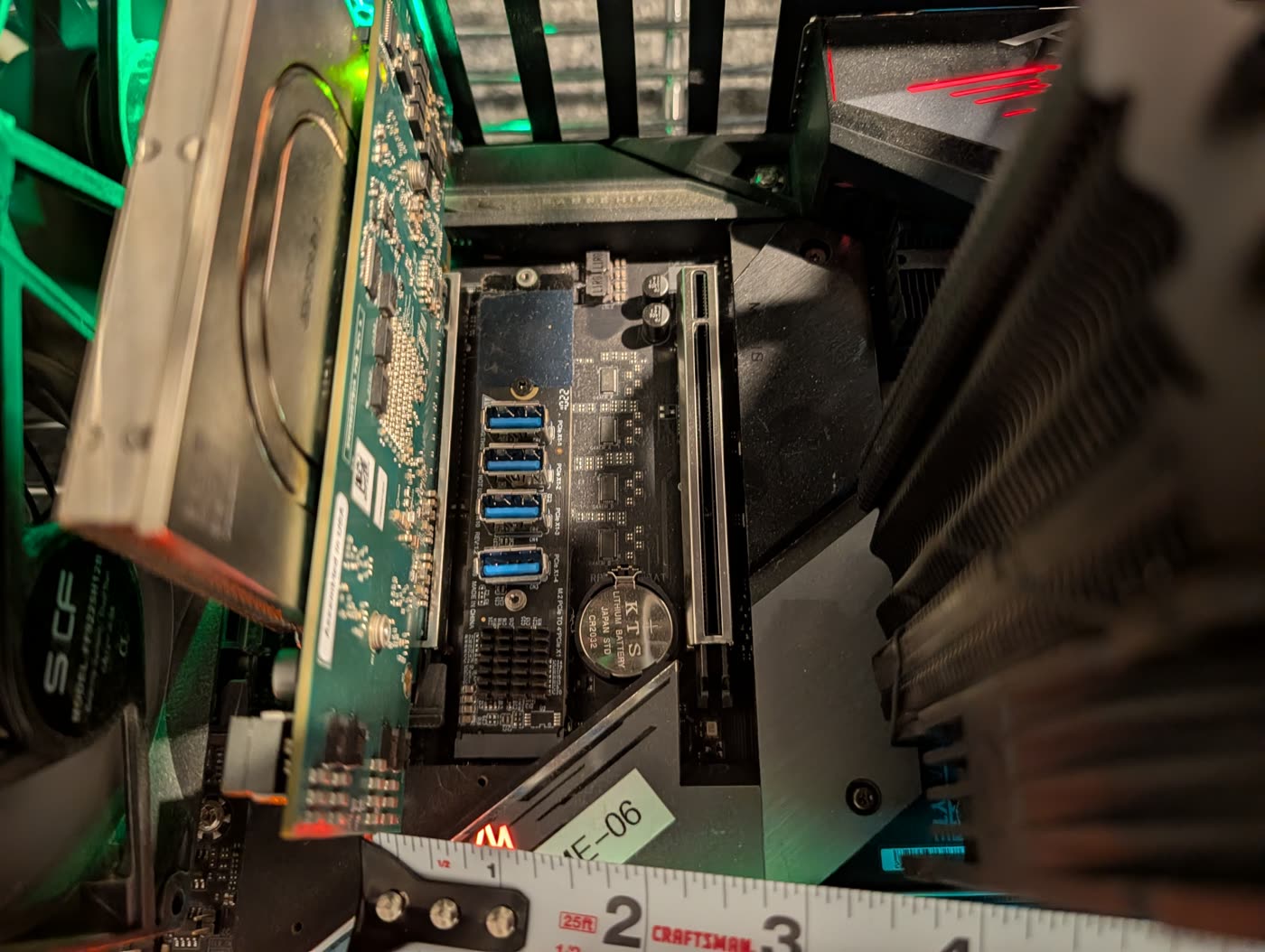
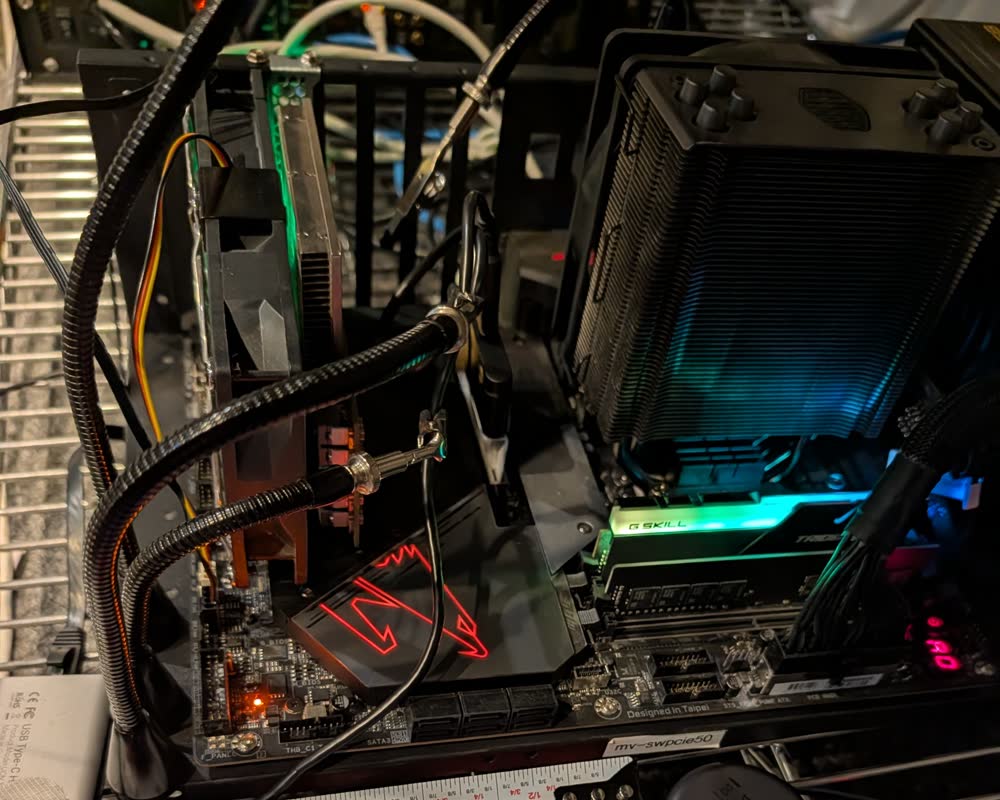
- It's aifoundry2, the box from the 9 Oct measurements. It has the same AORUS Z590 board, the same Cooler Master tower and the same mv-swpcie50 label. The card is in position 5 (PCIEX8) and the PCIEX16 in position 2 is empty. The day recap has you putting the camera "in front of aifoundry2".
- New since 9 Oct: an M.2-to-four-PCIe-x1 adapter sits uncovered between the two slots, where the 9 Oct drawing had M.2 covers. Its ports stand about a centimetre high, below the camera's lowest edge at about 28 mm. That holds only while nothing is plugged into them.
- The goosenecks hold, but they drift. The simulator's ±2 mm allowance is for exactly this kind of arm. A 3° tilt across a 40 mm view eats 2 mm of focus, and the hub's research puts a half-pixel wobble on a steep gradient at a 70–170 mK error.
Why the open slot works
Expansion slots are 20.32 mm apart (the ATX standard), so slot 2's centreline is 61 mm from the card's centreline. Take off half the board's thickness and it's 60.2 mm from the card's back. Where the camera sits on the fake card decides the rest:
| Where the P3 sits | Lens to the back | Sees | Focus holds | Air to the fins |
|---|---|---|---|---|
| Flat on the card's side | 40 mm | 26 × 19 mm, part of the die | ±1.0 mm | 31 mm |
| Centred in the window | 52 mm | 34 × 25 mm, the die | ±1.6 mm | 20 mm |
| 8 mm toward the cooler | 60 mm | 40 × 30 mm, the die and its capacitors | ±2.2 mm | 12 mm |
| Flush on the cooler's side | 62 mm | 41 × 31 mm | ±2.3 mm | 10 mm |
Across the range the pixels cover 0.10 to 0.16 mm of board.
- 60 mm is the setting. The die (26 × 22 mm) only fits whole from 46 mm. At 60 mm there's still 12 mm of air behind the camera, and the hub's next steps already asked for 60–65 mm from a holder on the rail the card is screwed to.
- The distances are to the lens's front. Its optical centre sits a few millimetres behind, which shifts every row the same way. You focus by eye anyway.
- The slot fixes the two things the goosenecks don't: the camera is square to the card, because both stand in slots on the same rail, and it returns to the same place after you take it out for focusing or calibration.
Three ways to build it
| 1. Printed fake card | 2. A slot fan bracket | 3. A slot cover plus VHB | |
|---|---|---|---|
| What | an ASA plate with a window and a sliding cradle, on a steel slot cover | a PCI-slot fan bracket in slot 2, the P3 on a plate where a fan goes | FR4 or aluminium on a slot cover, the P3 taped flat to it |
| Lens distance | 40–62 mm, set at 60 | set by the bracket (measure it) | 40 mm only |
| How well it holds | rigid, square, returns to the same place | rigid | VHB creeps slowly in warm air |
| Parts | ~$20–25 + the print | ~$8–15 bracket + screws + the print | ~$25–30 |
| Verdict | build this | a stopgap | close-ups only: the die doesn't fit at 40 mm |
Rules for any of them:
- Nothing with copper fingers goes into the connector. Don't seat the fake card at all. It hangs from slot 2's screw like any card's bracket, with its lower edge a few millimetres above the connector.
- No glue on the card, the board or the camera. The P3 sits in a clamp-on cradle, so it comes out for focusing and calibration. If anything is glued, it's the cradle to the fake card; VHB comes off with floss and a little heat.
- Keep the camera cool. The P3's manual rates it to 55 °C. The card's back read 41–47 °C on Friday's stream and runs hotter under load. Print in ASA: the hub's research has PETG sagging near 62–68 °C, and PLA is out. Keep the plate open, put one flat baffle between the camera and the fins, and watch the camera's own temperature in the telemetry.
- Airflow stays as it is. Air through the cooler runs front to back, parallel to the plate, and the card's own fans are on its other face.
- The cable carries the strain. The USB-C plug is the camera's only structural point, so clamp the cable within 30 mm of it. Run it along the plate's top edge and out over the rear wall.
- It's the lab's machine. Ask Roman Shaposhnik or Nate Padgett first: the fake card takes the board's only x16 slot for weeks, and aifoundry2 may become the firmware box. Power it down for the install, as on 9 Oct.
What to build
- The plate: ASA, 3 mm, low profile (no taller than 69 mm), about 125 mm long from the bracket, with a lattice everywhere except round the window.
- The window: 61 × 29 mm (the P3 is 59 × 27 × 17.2 mm). Centre it about 86 mm in from the rear wall and 42 mm above the motherboard, the 9 Oct estimates for the chip's centre. Give it ±10 mm of slots both ways until those are measured.
- The cradle: start from the P3 cover system on MakerWorld, whose back piece is meant to be adapted (the hub's pick). Two rails run through the window, and two M3 nylon thumbscrews lock it anywhere from 40 to 62 mm. Add a split collar or a Kapton strip to lock the focus ring, and a cable clip.
- The bracket: a stock steel full-height slot cover, drilled for two M3 nylon screws into the plate's flange, so slot 2's own screw holds everything. Line the plate up over the connector's centreline.
| Part | Price | Where |
|---|---|---|
| Steel full-profile slot covers, 10-pack (StarTech PLATEBLANK) | $12.29 list | SHI |
| M3 nylon screws, nuts and standoffs, ~180 pieces | $7.89–9.99 | Walmart, WREKD |
| The ASA print | a lab printer, or a service's quote (JLC3DP has no minimum order) | JLC3DP |
| 3M VHB 5952, ¾ in × 15 ft (baffle, or option 3) | $14.99 | Walmart, read Sun 18 Oct |
| Option 2: Akasa AK-MX304-08BK slot fan bracket (80/92 mm) | €7.90; $14.68 when in stock | Caseking, Memory C |
Then, in order:
- Ask Roman Shaposhnik or Nate Padgett for slot 2 and a time to power aifoundry2 down.
- Spend ten minutes with the measure on the next visit (the list below).
- Model it from the MakerWorld cover and print it in ASA.
- Power down, screw the fake card into slot 2, set the cradle at 60 mm and route the cable out.
- Boot and let it run warm for 20 minutes. Focus on the capacitors' cold dots with the live focus meter (Focusing the P3), lock the ring and add a witness mark.
- Tap the frame: if the picture jumps, tighten. Watch the camera's own temperature through one loaded run.
Next visit: what to measure
- Slot 2's centreline to the card's back: expect about 60 mm.
- Slot 2's centreline to the nearest cooler fin: expect about 29 mm (89 less 60).
- The chip's centre on the card's back: how far in from the rear wall and how high above the motherboard (estimated at 86 and 42 mm).
- Slot position 2 in the rear wall: is it open, and does its screw take a 6-32 or an M3?
- The M.2 adapter: its height, and whether risers are about to go into it.
- The P3's lens: where it sits on the camera's face, with calipers, so the window can be centred on it.
Sources, and how this page was built
- Your photos, Fri 16 Oct 18:10:53 and 18:11:08 (
Dropbox/photos), read at full resolution. The copies here have their metadata removed, and the first is cropped above the phone. The Fri 16 Oct day recap has you putting the camera in front of aifoundry2. - Friday thermal measurements (9 Oct): the card in position 5 and the PCIEX16 in position 2 (Gigabyte Z590 AORUS MASTER manual), the 89 mm to the fins, the chip's centre at about 86 mm in and 42 mm up, and the bracket-in-slot-2 geometry. The ATX 2.2 spec gives the slot pitch, 0.800 in.
- The focus simulator (14 Oct): its thin-lens model gives the fields above (3.072 × 2.304 mm sensor behind a 4.3 mm lens), and focus within ±2.2 mm at 60 mm, growing with the square of the distance.
- The camera: 59 × 27 × 17.2 mm, 26.3 g, focus from 8 mm to infinity (
THERMAL_MASTER_P3.mdin the thermal-android repo, from the reverse-engineered P3). The −10 to 55 °C rating is from the P3 manual, as cited on the hub. - The hub's next steps: the cradle, ASA over PETG, the cable advice, and the 70–170 mK cost of a half-pixel wobble.
- Prices, read Sun 18 Oct 2026: the listings linked in the parts table. US stock for the Akasa bracket is uncertain. TME lists it at $6.19 net for business buyers.
- The geometry script sits in this session's scratchpad:
geom.pyfor the table,svg.pyfor the drawing.
Total life satisfaction: a camera that stays put turns Friday's live stream into measurements you can repeat, which is the step from a demo toward the thermal model in your Project doc. It also adds a print and a lab visit to an already full week, so it's worth doing only when the measuring is what you want next.